Showing posts with label FACEBOOK. Show all posts

Friday, 12 April 2013

Block Facebook On Your Computer In Few Simple Steps

facebook blocker
I had previously posted about Blocking Facebook on your computer but many users were facing difficulties doing that. So In this tutorial i will share with you guys an amazing programme or small little tool that will allow you block facebook on your computer easily in just few simple steps. So lets get started

How To Use Facebook Blocker ? 

 1. First download Facebook Blocker by Clicking Here
  2. Extract the file and right click on Facebook Blocker.exe and run it as administator (Important)
  3. Press 1 in order to  backup your host file to be on the safe side.
facebook blocker
  4. Now Press 2 to block facebook
  5. Its time to check if facebook is blocked or not to do that Press 5
  6. Hope this help you if you have any question leave a comment below.

More Computer Tricks & Tips

Wednesday, 13 March 2013

Blocking Facebook On Your Computer

I had previously posted about Blocking And Unblocking any websites on your computer. In this tutorial i will teach you to specifically block facebook on your computer. This might be helpfull if you want to prevent students from using facebook in school and colleges or your employees in office. If you are parent and don't want you child to use facebook or any other particular site then follow simple steps given below. So lets get started.

How To Block Facebook ?

1. Go to Start > Programmes > Accesories
2. Then Right click on Notepad and Run it as administrator.
3. Now open host file by clicking on File > Open and locate to following address

     C:\WINDOWS\system32\drivers\etc

4. Then just below # 127.0.0.1 localhost paste folowing code

# Blocking Facebook
127.0.0.1 login.facebook.com
127.0.0.1 www.facebook.com
127.0.0.1 apps.facebook.com
127.0.0.1 blog.facebook.com

5. Now save the host file and done.
6. Open any browser and try to open facebook. It won't open. If facebook opens then you might have done somthing wrong. (let me know if you face any problem)

Blocking Other Website

If you want to block website other then facebook then change facebook address with whatever website you want to block. For example: to block google paste following code below # 127.0.0.1 localhost

# block google
127.0.0.1 www.google.com

Any Question

If you find any difficulty blocking facebook on your computer then leave a comment below i will be glad to help you out. You also like to read some  interesting tutorial given below.

Saturday, 16 February 2013

Posting Facebook Status Upside Down

facebook status upside down
In this tutorial i will share with you simple facebook status trick. If you want to post something creative or something cool as your facebook status then this trick will let you post any facebook status upside down. Basically this is a website which allows you to flip your text. so lets dive into it.

How To Do ?

  1. First GoTo FlipText Website by Clicking Here.
  2. Enter you message or text in text area and click on Flip.
  3. Copy the upside down text and paste it in your facebook status or where ever you want to use it.
  4. Enjoy!

Other Awesome Facebook Tricks

Wednesday, 14 November 2012

New Facebook Smiley Codes for Chat

facebook smiley
In my previous facebook post i had posted about Facebook Chat Trick and Facebook smiley addon. In this post i will share with you guys some new facebook smiley codes which you can paste in your chat box to get cool smiley faces like angel, gift, love, angry, laugh, wine etc. check the codes below.

Code For Facebook Smileys


[[f9.laugh]]
[[f9.sad]]
[[f9.angry]]
[[f9.sleepy]]
[[f9.shock]]
[[f9.kiss]]
[[f9.inlove]]
[[f9.pizza]]
[[f9.coffee]]
[[f9.rain]]
[[f9.bomb]]
[[f9.sun]]
[[f9.heart]]
[[f9.heartbreak ]]
[[f9.doctor]]
[[f9.ghost]]
[[f9.brb]]
[[f9.wine]]
[[f9.gift]]
[[f9.adore]]
[[f9.angel]]
[[f9.baloons]]
[[f9.bowl]]
[[f9.cake]]
[[f9.callme]]
[[f9.clap]]
[[f9.confused]]
[[f9.curllip]]
[[f9.devilface] ]
[[f9.lying]]

You May Also Like To Check This


Monday, 23 January 2012

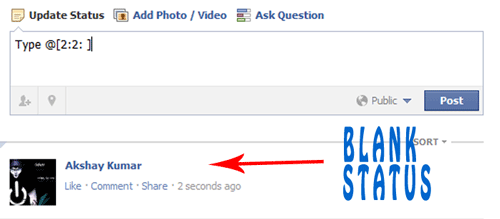
Paste blank Status on Facebook


       Today i will show you how to publish single line or multiple line blank status on facebook. You can also use this method in facebook comments. So lets get started.

   For single line Blank Status

  • Copy below codes into your status
@[0:0: ]
  • Note:- the text is like @[0:0:space]
  • Dont write space where i have writen space rather press spacebar.
 
   For MultiLine Blank Status :

  • Paste as shown below in your staus.
    @[0:0: ]
    @[0:0: ]
    @[0:0: ]
    @[0:0: ]
    @[0:0: ]
    @[0:0: ]
    • Note there is space after 0:
      
      Another method

    • Paste below codes into facebook status
    @[2:2: ]
    • Done ! subscribe below for such great posts.

    Wednesday, 4 January 2012

    New facebook chat trick

    facebook chat trick

              Facebook has recently made changes to its chat features. Now we can use profile images in chat. You can even type anything in colour using a simple trick. You just need to know how to get facebook profile id which you will learn by reading this article Trick to find facebook profile id. Below are codes of A-Z and guide on how to use them in chat.


           1. How to use facebook profile images in chat ?
    • To use profile images in chat Enter this ==> [[username]]
    • In place of username enter username of person whose image you want to show in chat. 
    • If u will enter c00lhacks this will show image of my page. 

           2. Codes of A-Z for Facebook chat.

    • Below are codes of A-Z which you can use in facebook chat. You can create your on words with this codes. I will demonstrate how to do that .
    [[107015582669715]]  = A
    [[116067591741123]]  = B
    [[115602405121532]]  = C
    [[112542438763744]]  = D
    [[115430438474268]]  = E
    [[109225112442557]]  = F
    [[111532845537326]]  = G
    [[111356865552629]]  = H
    [[109294689102123]]  = I
    [[126362660720793]]  = J
    [[116651741681944]]  = K
    [[115807951764667]]  = L
    [[106596672714242]]  = M
    [[108634132504932]]  = N
    [[116564658357124]]  = O
    [[111669128857397]]  = P
    [[107061805996548]]  = Q
    [[106699962703083]]  = R
    [[115927268419031]]  = S
    [[112669162092780]]  = T
    [[108983579135532]]  = U
    [[107023745999320]]  = V
    [[106678406038354]]  = W
    [[116740548336581]]  = X
    [[112416755444217]]  = Y
    [[165724910215]]        = Z
           
          3. How to use this codes ?
    • First think wat word you want to create then pick up codes of that alphabate from above codes
    • Let us create hi . So pick up codes of H and I .
    • After that enter this in chat box  [[111356865552629]]  [[109294689102123]] 
    • Make sure there is space in between any two codes or else it will not work.
         
          4. Some Cool Facebook tricks.
    • Below are two codes to show Happy New year you can use any one of them
    [[124641767652266]] [[124642810985495]] [[124643044318805]] [[124643044318805]] [[124643487652094]] [[124642300985546]] [[124644090985367]] [[124644404318669]] [[124644567651986]] [[124642300985546]] [[124643487652094]] [[124644404318669]] [[124642810985495]] [[124645367651906]] [[124642300985546]] [[124645977651845]] [[124646247651818]] [[124646574318452]] [[124645977651845]] [[124642300985546]]

    OR

    [[337992182896839]] [[225777904163650]] [[244015585667152]] [[244015585667152]] [[319152701438185]] [[188142511282558]] [[319977728035866]] [[316759491692170]] [[139287272851910]] [[188142511282558]] [[319152701438185]] [[316759491692170]] [[225777904163650]] [[337598512918963]] [[188142511282558]] [[141281852650929]] [[268263169900550]] [[191790684249921]] [[141281852650929]]

    • Enter below codes to show Cool Hacking Tricks
    [[115602405121532]] [[116564658357124]] [[116564658357124]] [[115807951764667]]    [[111356865552629]] [[107015582669715]] [[115602405121532]] [[116651741681944]] [[109294689102123]] [[108634132504932]] [[111532845537326]]     [[112669162092780]] [[106699962703083]] [[109294689102123]] [[115602405121532]] [[116651741681944]] [[115927268419031]]
    • This way you can create your own words your name .
    • Hope you like it subscribe below for such more tutorials and feel free to leave comments.

    More Facebook Tricks

    Saturday, 3 December 2011

    Trick to find facebook Profile ID


                   In my previous post i have posted about Facebook status update trick in which we use profile id, but what if  person got username. So this is the trick which will let you get profile id of any person who got custom username. Check below image and see how URL of  facebook profile looks before and after custom username.


                      In case of Profile ID before custom username you can easily identify it by looking at Profile URL, But in case of profile with custom username its not same. Below are simple steps to find Profile ID having custom username.
    • Go to the profile you want to find Profile ID
    • That URL will look like this www.facebook.com/username
    • Change that URL to graph.facebook.com/username
    • Then you will get something like below image.


       Subscribe below For such more tutorials !!!

    Monday, 21 November 2011

    Enable facebook HTTPS


                    This is old trick but still if you are not aware of this then this is for you. Facebook has added new feature to browse it securely but is not set by default. Facebook has changed without any notification.Take a look at your URL (top box on your screen.). If you see "http" or just "www" instead of "https" you DO NOT have a secure session & can be hacked.To secure your facebook account just follow the below Steps.


           1. Go to Account 
           2. Then Account Settings 
           3. Then click on Security
           4. Check box (secure browsing)
           5. Click on Save changes.

    Sunday, 13 November 2011

    Facebook Status update trick


              This is an amazing facebook trick which you would love to use. So the trick is to update your status with name of any app like Nasa, Iphone 5, HTC etc. Still confused just follow below instruction and clear your mind.


           1. First Login to your Facebook account.
           2. Copy below link into address bar as shown in the below picture.
     
    http://www.facebook.com/connect/prompt_feed.php?preview=true&display=touch&    api_key=XXXXXXXXX&target_id=YYYYYYYYYY

         
           3. In place on XXXX put api key given in below list and in place of YYYY put profile id of
               person where you want to publish your message.
           4. Now you will be redirected to new screen as above enter your message and done.


          API KEY LIST  
    • Skynet (249284985083592)
    • iPhone (6628568379)
    • Blackberry (2254487659)
    • Palm (7081486362)
    • Sidekick (21810043296)
    • Sony Ericsson (38125372145)
    • Xbox LIVE (5747726667)
    • iPad (112930718741625)
    • Foursquare (86734274142)
    • Telegram (140881489259157)
    • Carrier Pigeon (130263630347328)
    • Morse Code (134929696530963)
    • Message in a Bottle (123903037653697)
    • Commodore 64 (138114659547999)
    • Your moms computer (132386310127809)
    • TRS-80 (134998549862981)
    • K.I.T.T. (129904140378622)
    • Mind Computer Interface (121111184600360)
    • eyePhone (110455835670222)
    • toaster (203192803063920)
    • microwave (0a5266c8844a1b09211e7eb38242ac2f)
    • Super Nintendo Entertainment System (235703126457431)
    • Gameboy Color (180700501993189)
    • GoD (256591344357588)
    • Glade Air Freshner (4aeb4db2e8df1cdb7f952b2269afb560)
    • Strawberry (a4c9fb1708a848c2241674531176209b)
    • The moon (221826277855257)
    • Dr. Pepper (eea90d40e1d12565695dbbbdbd5e965b)
    • Nintendo wii (243870508973644)
    • Alcohol (250335888312118)
    • Cheese (218791271497130)
    • iPod Nano (142039005875499)
    • Nintendo 64 (236264753062118)
    • Microsoft Excel (242740155751069)
    • Linux Ubuntu (220593361311050)
    • iPhone 5g (211333348912523)
    • My Bedroom (174811032586879)
    • Your Mums Bedroom (5f64bbc9ac2f12b983200925da461322)
    • Lamp (230755826955133)
    • Your moms anus (b625297b655f0b46c86b68f754b82121)
    • Refrigerator (250828364944350)
    • A potato (127926427295267)
    • Nasa Satellite (31d608d30292175bf7703149699ccb39)
    • Vibrator (eb4c6d1a60e19a7795da501e1f468035)
    • Sperm Whale (170318539700306)
    • Pogo Stick (185103391549701)
    • Banana Phone (1477a4cd29ec724a3de19be5d26e0389)
    • Google+ (4d8243dbb7064f88351fe6c809582320)
    • The Future (108372819220732)
    • Smoke Signal (134138923334682)
    • tin cans connected by string (242191299125647)
    • Pokedex (de3da265cf6976745bb1d60a8c198151)
    • Telepathy (ea01a57edb26cf1de143f09d45cfa913)
    • Typewriter (d3d554bf60297cb2c384e3d7cf5a066d)
    • Harry Potter (b8ebeb983f45eaa0bd5f4f66cad97654)
    • TARDIS (200439256674396)
    • Pip Boy (142806259133078)
    • Mind Control (1dc633368924b3b0b4d08e3f83230760)
    • Jedi Mind Control (240597869302110)
    • Telekinesis (224139600960217)
    • Post-It Note (115227201900831)
    • GLaDOS (246126362083515)
    • Ansible (185474028180003)
    • W.O.P.R (228373497202865)
    • Airwolf (123944137696757)
    • HMCS Belafonte (222345601140304)
    • HAPPY BIRTHDAY (60280877509)                                           
           Any problem feel free to ask question and if you like my post just say thanx it will take less then 5 sec. Enter your email in below box and get free tutorials daily.

    Friday, 4 November 2011

    Keyboard Shortcuts For Facebook

    facebook keyboard shortcuts
    Facebook is one of the most popular social networking site where most of us spend hours chatting and surfing on facebook. So here are some usefull facebook keyboard shortcuts for Google chrome and Mozilla Firefox users.

    Mozilla Firefox

    • Shift+Alt+1: View your News Feed
    • Shift+Alt+2: View your own Profile
    • Shift+Alt+3: View pop-up of friend requests
    • Shift+Alt+4: View pop-up of messages
    • Shift+Alt+5: View pop-up of notifications
    • Shift+Alt+6: View Account Settings
    • Shift+Alt+7: View Privacy Settings
    • Shift+Alt+8: View Facebook’s own profile
    • Shift+Alt+9: Read latest Terms of Service agreement.
    • Shift+Alt+0: Open Facebook Help Center

    Google Chrome

    • Alt+1: View your News Feed
    • Alt+2: View your own Profile
    • Alt+3: View pop-up of friend requests
    • Alt+4: View pop-up of messages
    • Alt+5: View pop-up of notifications
    • Alt+6: View Account Settings
    • Alt+7: View Privacy Settings
    • Alt+8: View Facebook’s own profile
    • Alt+9: Read latest Terms of Service agreement.

    You May Also Like

    Thursday, 3 November 2011

    Cool smiley addon for Facebook chat !


                     Today i will show you an amazing Google addon for facebook smileys. This will let you use smileys easily in your facebook chat. I loved this addon hope you also like it. Follow below steps to get it now.


    1. Go to this Facebook addon Link
    2. Now click on Add to chrome
    3. Done !!!